
A charge for $14.99 appears on a Tuesday.
The description is a few initials, an asterisk, and half a word. It does not look like the name of an app, a store, or anything anyone in the house remembers buying.
Maybe it was an audiobook. Maybe it was parking. Maybe someone started a free trial in February and forgot that the word free had an expiration date.
The amount is too small to feel like an emergency and too mysterious to ignore. That is exactly how these charges manage to survive for months.
Fortunately, most of them have only a few places to hide.
The short answer
Set a timer for twelve minutes and check three places:
- Your phone’s subscription list
- Your bank or credit-card statement
- Your email inbox
Keep a sheet of paper beside you. Write down every subscription or repeating charge you find, but do not stop to debate each one yet.
This is a first pass, not a forensic investigation. The goal is to identify the obvious charges and decide which ones deserve another month of your money.
First, read the strange name carefully
The name on a statement is not always the name you know.
A company may use a payment processor, an app store, a parent company, or a shortened billing name. An asterisk sometimes separates the payment platform from the merchant information, but statement formats vary. Treat it as a clue, not a universal code.
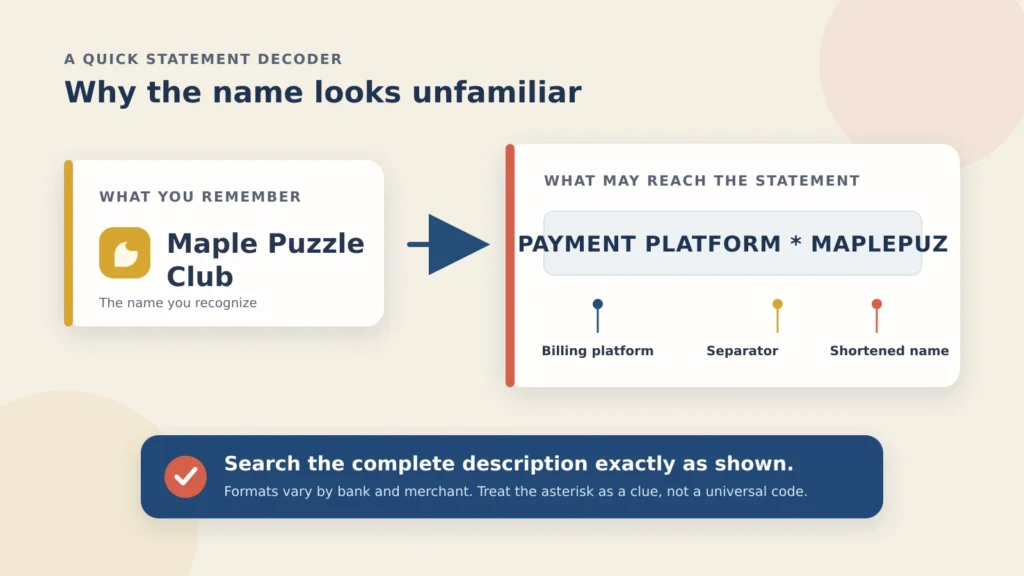
Copy the entire description exactly as it appears—including the asterisk and any odd abbreviations—and search for it with the word charge. If that identifies only the billing company, search your email for the same description. A receipt often supplies the missing product name.
In other words, the line may not be nonsense. It may be two shortened names squeezed into a space designed by someone who has never had to recognize a $14.99 charge.
The twelve-minute first pass
Paper ready? Start the timer.
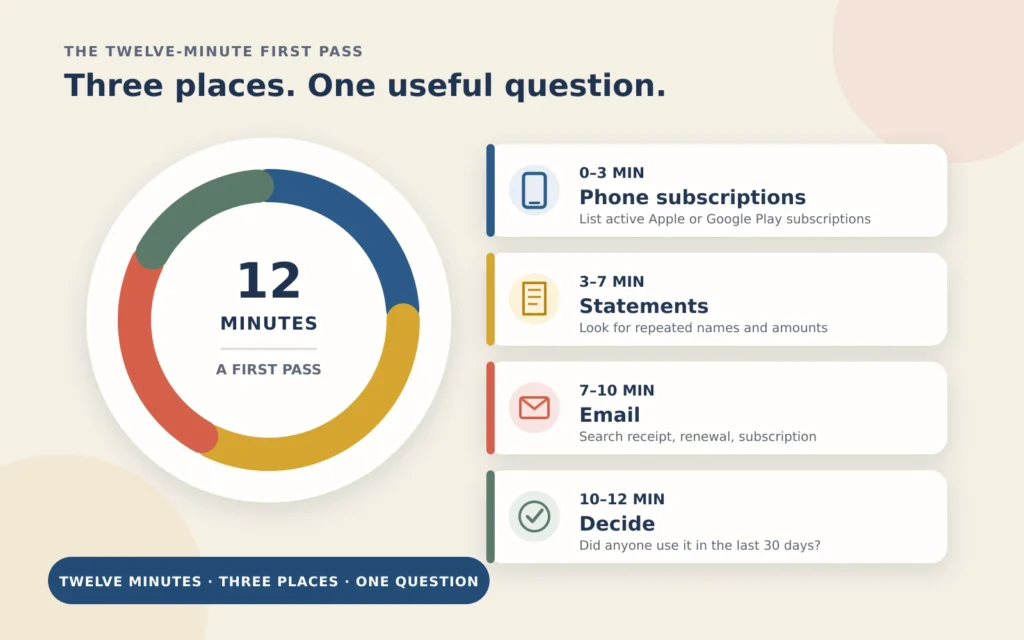
Minutes 0 to 3: check your phone subscriptions
Start here because it is quick, and because subscriptions bought inside apps are easy to forget.
On an iPhone or iPad
- Open Settings.
- Tap your name at the top.
- Tap Subscriptions.
- Open anything you do not recognize or no longer use.
If you decide to stop one, tap Cancel Subscription. You may need to scroll. If there is no cancel button, or the screen shows an expiration message in red, Apple says it is already cancelled.
On an Android phone
Open your subscriptions in Google Play, select the subscription, and follow the cancellation instructions. Make sure you are using the correct Google account; a subscription bought through another account will not appear in the list you are viewing.
This catches subscriptions billed through Apple or Google. It will not catch everything you bought directly from a company’s website, even if you use that company’s app every day. That is why the next two stops matter.
Write down the active subscriptions and their prices. Keep moving.
Minutes 3 to 7: scan your statements
Open the account you use most often and look at the last three months of transactions.
You are not auditing your life. Ignore groceries, restaurants, and the hardware-store trip you already remember. Look for repetition:
- The same merchant at the same price
- A charge that returns near the same date each month
- A small amount you have repeatedly meant to investigate
- A name that does not match any company you recognize
Write down the merchant description, amount, and date exactly as shown.
Three months will catch many monthly and quarterly charges. Annual renewals are slipperier; we will look for those in your inbox next.
If one transaction looks completely unfamiliar—not merely forgotten, but possibly unauthorized—mark it with a question mark. Do not cancel it as though it were an ordinary subscription. It may need a call to the card issuer.
Minutes 7 to 10: search your email
Your inbox is often a better spending record than it looks. Companies send welcomes, receipts, renewal notices, and cheerful announcements that your free trial has become a paid relationship.
Try these searches separately:
receiptrenewalsubscriptionwelcome to
Then search for any billing name you copied from the statement.
Pay special attention to annual charges: antivirus software, photo storage, warehouse-club memberships, domain names, news subscriptions, and apps that bill once a year. They are easy to miss because they do not repeat often enough to become familiar.
Add anything useful to your paper. You should now have one imperfect but revealing list.
Minutes 10 to 12: ask one question
Go down the list and ask:
Did anyone in this house use this in the last thirty days?
- Yes: Keep it. No courtroom argument required.
- No: Cancel it now, while it is in front of you.
- Not recently, but it is seasonal or annual: Mark it for a separate decision instead of cancelling on impulse.
- Nobody recognizes it: Investigate it before treating it as a forgotten subscription.
The value of one question is not that it makes every decision for you. It keeps a simple cleanup from becoming an hour-long referendum on every entertainment choice your family has made since 2022.
Why the timer works
Signing up often takes one tap. Leaving may require a password, four screens, a discounted offer, and one last button written in the visual equivalent of a whisper.
That imbalance is useful to remember:
A subscription does not need you to say yes every month. It only needs you not to get around to saying no.
The timer creates a small appointment with the task. Twelve minutes of deliberate attention can beat six months of meaning to look into it.
This is maintenance, not a financial overhaul. Two forgotten subscriptions at $12 a month add up to $288 a year—not a fortune, not nothing, and very easy to overlook when they arrive in small pieces.
Four things to know before you cancel
1. Check storage and backups first
Be careful with iCloud+, Google One, and any other service holding photos, email, or device backups.
If you are using more than the free storage allowance, downgrading can interrupt syncing, backups, or other services. Leave storage alone until you know what is stored there and where it will go next.
Cancel the forgotten game before the only copy of the family photos.
2. Deleting an app does not cancel its subscription
Removing an app only removes it from the phone. Apple and Google subscriptions must be managed through the account that handles the billing; subscriptions bought directly from a company usually must be cancelled with that company.
An app can be long gone while its monthly charge remains impressively punctual.
3. Cancellation and refund are different questions
For many Apple and Google Play subscriptions, cancelling stops the next renewal while access continues through the period already paid for. Refund policies vary, so do not assume that cancellation automatically returns the latest payment.
If an Apple free trial is about to end, Apple advises cancelling at least 24 hours before the trial expires.
4. A truly unknown charge may be fraud
If the phone list, statement search, email search, and other household members cannot identify a charge, contact the card issuer or bank using the number on the back of the card or its official app.
Do not call a phone number found in a suspicious email or random search result. At that point, the problem is no longer “Which subscription did I forget?” It is “Did I authorize this?”
If the company makes cancellation difficult
Try the company’s account page or customer-service chat and save the confirmation. A useful sentence is:
Please cancel my subscription and recurring payments, and send me written confirmation.
Blocking a payment through your bank is not the same as cancelling a contract. The Consumer Financial Protection Bureau recommends contacting the company and, when necessary, the bank or credit union in writing. Banks may also charge for stop-payment orders.
Use a payment block as a backstop when ordinary cancellation has failed, not as the first button you press.
The bottom line
Open your phone’s subscription list first. Then scan three months of statements and search your inbox. Ask the same question about every item: did anyone use it in the last thirty days?
You may find nothing. You may find three things. Either result is better than allowing a line of initials and an asterisk to collect $14.99 indefinitely because it looked too annoying to investigate.
When the twelve minutes are up, put a reminder in your calendar for six months from now: Twelve minutes. Three places. One question.
The pile rebuilds itself quietly, one convenient tap at a time.
Related: Your Streaming Bill Went Up Again. Here’s the 20 Minutes That Fixes It. — for the subscriptions you recognize but may still be paying too much for.
Found a particularly strange one? Tell us what it was and where it was hiding. The odd examples are often the most useful.
Sources
- Apple Support — Cancel a subscription from Apple
- Google Play Help — Cancel, pause, or change a subscription on Google Play
- Consumer Financial Protection Bureau — How do I stop automatic payments from my bank account?
Instructions reviewed September 20, 2026. Menus, policies, and cancellation procedures can change; confirm them before a future update.